
A Guide to Kubernetes VPA

Kunal Verma
August 28, 2025 · Updated September 27, 2026 · 11 min read
In short
The Vertical Pod Autoscaler rightsizes pods by adjusting CPU and memory requests, scaling limits to keep each container's original ratio. Its Recommender builds decaying usage histograms and targets the 90th percentile plus a 15% margin, its Updater applies changes by eviction or, on Kubernetes 1.33 and later, by resizing pods in place, and its Admission Controller sets resources on new pods. VPA shouldn't scale on the same CPU or memory metrics as HPA, and it should start in Off mode in production.
In Kubernetes, managing resources like CPU and memory effectively is critical for maintaining performance, reducing costs, and ensuring application stability. Over-provisioning resources wastes money, while under-provisioning can lead to performance bottlenecks or application crashes. Striking the right balance is often challenging, especially in dynamic environments where workloads change frequently.
In this article, we’ll explore how the Vertical Pod Autoscaler (VPA) helps solve these challenges by automatically optimizing resource allocation for Kubernetes workloads. We’ll cover its components, how it works, types of recommendations it provides, and the steps to set it up, along with real-world use cases and practical insights.
VPA is one piece of the broader Kubernetes cost picture, for the full breakdown of what drives Kubernetes cost and how it’s managed, see our Guide to Kubernetes Cost Management.
Introduction to Vertical Pod Autoscaler (VPA)
The Vertical Pod Autoscaler (VPA) is a Kubernetes component designed to optimize resource allocation for workloads. Unlike the Horizontal Pod Autoscaler (HPA), which scales the number of pod replicas, the VPA adjusts the CPU and memory requests and limits of individual pods. This ensures workloads have the necessary resources without over-provisioning or under-provisioning, reducing costs and improving performance.
In environments where workloads are dynamic and unpredictable, the VPA helps maintain resource efficiency by adapting to changing demands. It’s particularly useful for DevOps engineers, SREs, and FinOps teams aiming to optimize costs while maintaining high availability and performance.
Key Components of VPA
The Vertical Pod Autoscaler (VPA) relies on three main components that work together to monitor, recommend, and apply resource adjustments for Kubernetes pods:
1. VPA Recommender
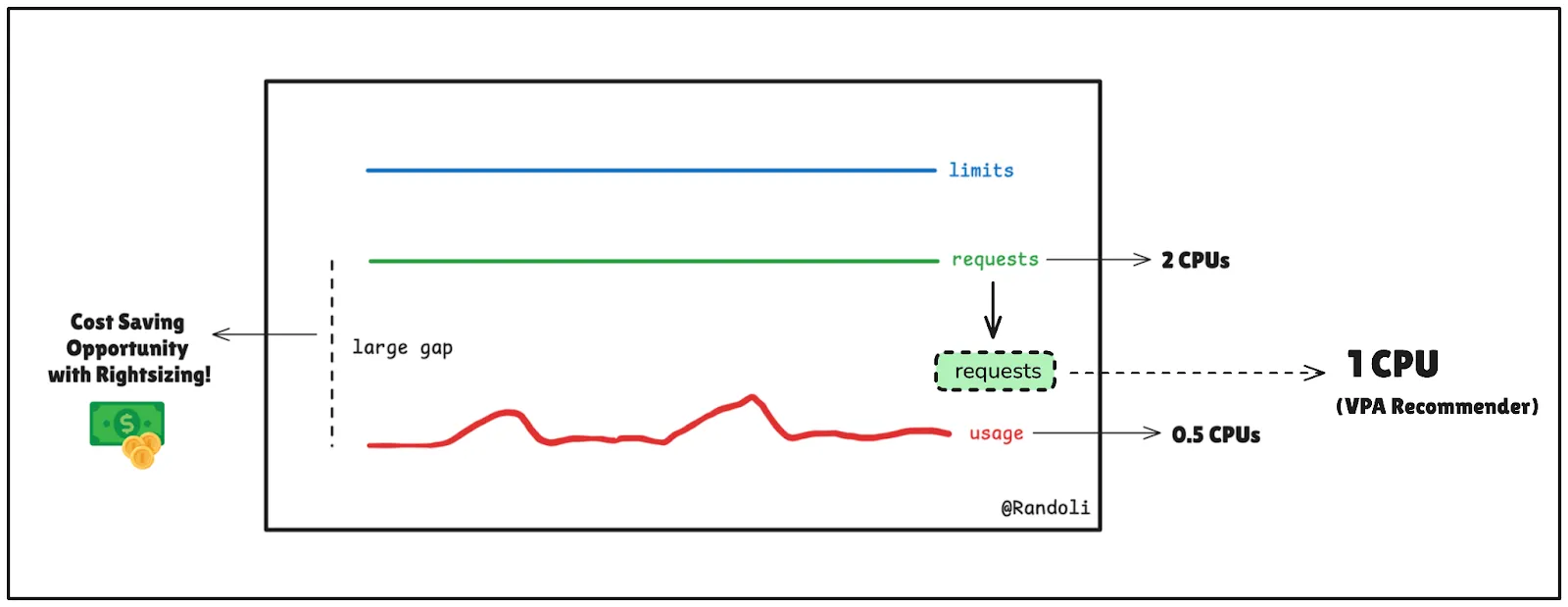
The VPA Recommender is the brain behind the operation. It analyzes historical resource usage data collected from sources like the Kubernetes metrics server or Prometheus. By studying patterns such as average and peak usage, it estimates the appropriate CPU and memory requests and limits for each pod.
For example, if a pod consistently uses 0.5 CPU cores (500m) but is allocated 2 CPU cores (2000m), the Recommender will suggest a request much closer to what it actually uses: roughly 575m, which is 500m plus VPA’s default 15% safety margin. That removes most of the over-provisioning while keeping headroom for normal variation.
VPA recommender
2. VPA Updater
The VPA Updater is responsible for applying the recommendations generated by the Recommender to pods that are already running. It has two ways to do that, depending on the update mode:
- Eviction (
Recreatemode): the Updater evicts the pod through the Eviction API, which respects Pod Disruption Budgets, and the workload controller recreates it. The Admission Controller then gives the new pod the updated resources. - In-place resize (
InPlaceOrRecreatemode): the Updater resizes the running pod’s CPU and memory without recreating it, and falls back to eviction only when an in-place resize isn’t possible.
Note:
In-place pod resize (KEP-1287) arrived as alpha in Kubernetes 1.27, went beta in 1.33, and became GA in 1.35. VPA’s
InPlaceOrRecreatemode, which uses it, has been generally available and enabled by default since VPA 1.6, and needs Kubernetes 1.33 or later. On older clusters, VPA applies changes by recreating pods.
3. VPA Admission Controller
The VPA Admission Controller acts as a gatekeeper during pod creation and updates. It ensures that new pods are created with the recommended resource requests, with limits scaled to match. This guarantees that the pods are rightsized from the start, reducing the likelihood of inefficiencies.
For instance, if a deployment creates 10 new pods, the Admission Controller automatically injects optimized resource values into their configurations before they are scheduled on the cluster nodes.
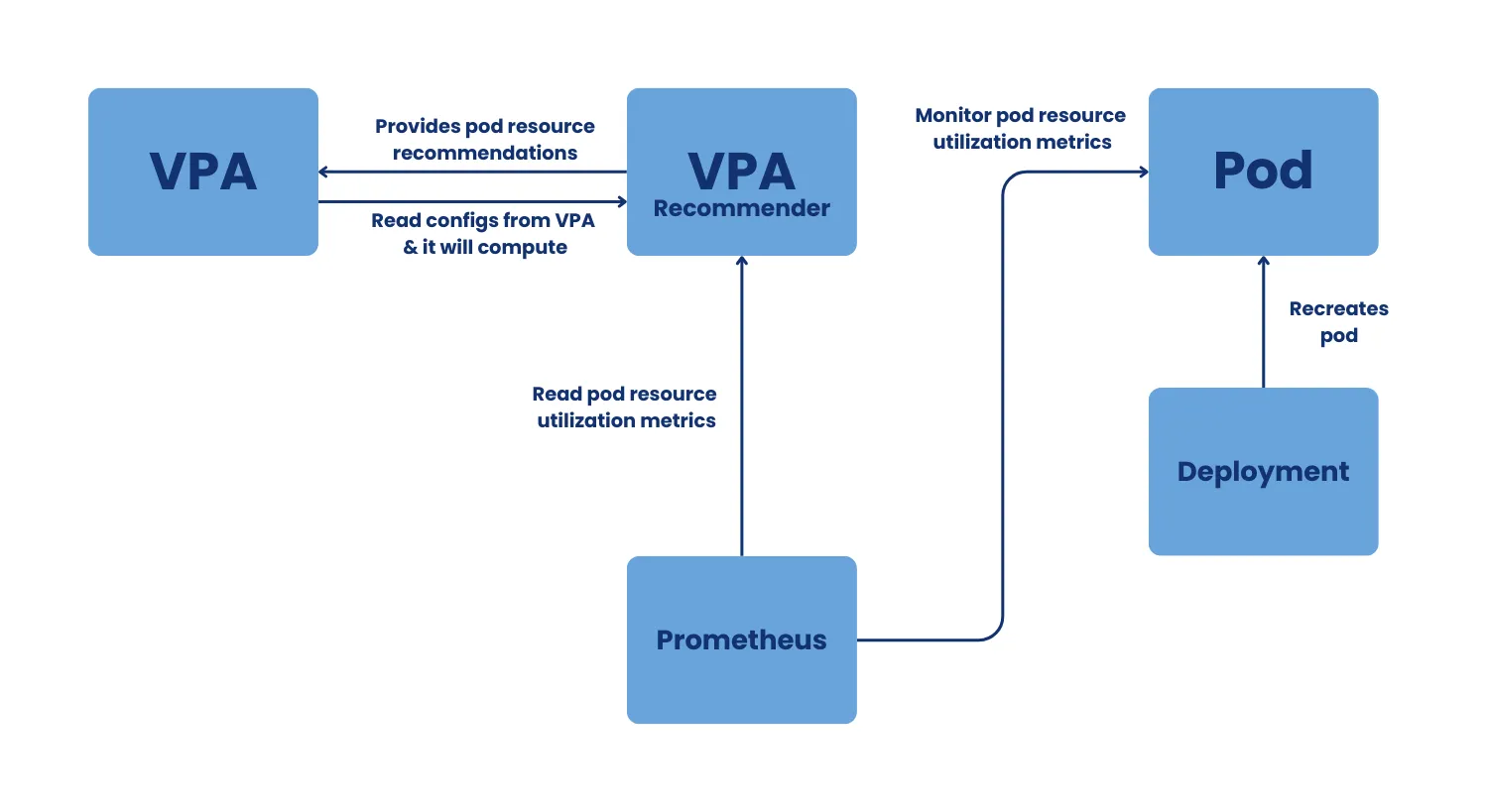
VPA workflow chart
For a more detailed breakdown of the VPA components, refer to this documentation.
Understanding how the VPA Recommender Works
The VPA Recommender analyzes resource usage patterns and generates actionable recommendations to optimize workload performance. Here’s how it operates:
1. Collecting Resource Usage Data
The VPA Recommender collects historical resource usage data from Kubernetes metrics sources, such as the metrics server, Prometheus, or other monitoring tools. This data includes information about CPU and memory usage patterns for each pod in the cluster.
Each usage sample is weighted by age: by default a sample loses half its weight every 24 hours, so recommendations follow the pod’s most recent behavior. By default the Recommender builds its history from live metrics and saves it in checkpoint objects in the cluster. If you configure Prometheus as its history source, it can also backfill up to 8 days of past usage when it starts.
Tip:
Using Prometheus as your metrics source allows for greater flexibility in data retention policies and fine-grained usage tracking.
2. Analyzing Resource Usage Patterns
Once the data is collected, the Recommender analyzes usage trends over time. It identifies key patterns, such as:
- Peak Usage: The maximum resource consumption during spikes.
- Average Usage: The typical resource consumption during steady-state operation.
- Usage Trends: Variability in resource usage over different time periods (e.g., daily, weekly).
This analysis enables the Recommender to account for both stable workloads and workloads with dynamic demands.
Note:
Workloads with highly unpredictable spikes may require additional configuration, such as Burstable QoS settings, to handle sudden increases in resource usage. (discussed in the next section)
3. Using a Histogram-Based Algorithm
To calculate recommendations, the VPA uses a histogram-based algorithm. Histograms are statistical representations of resource usage data, allowing the VPA to estimate resource needs with high accuracy. Here’s how it works:
- The algorithm sorts usage samples into buckets that grow exponentially in size, so small values get fine-grained buckets and large ones get wide buckets. CPU is tracked as individual usage samples; memory is tracked as the peak usage in each 24-hour window.
- Percentile analysis on those histograms produces three values:
- target: the 90th percentile, the value VPA applies as the request.
- lowerBound: the 50th percentile.
- upperBound: the 95th percentile.
- A 15% safety margin is added on top, and recommendations never go below 25 millicores of CPU or 250 MB of memory per pod. After an OOM kill, the memory recommendation is bumped up (by 20%, or at least 100 MB).
The lower and upper bounds aren’t the request and the limit. They’re a confidence range: the Updater only acts on a running pod when its current request falls outside that range, which keeps VPA from restarting pods over small changes.
Limits aren’t calculated from a percentile at all. When VPA applies a new request, it scales the limit proportionally so the container keeps its original limit-to-request ratio. For example, a container that started with a 400m request and an 800m limit, and gets a 300m recommendation, ends up with a 300m request and a 600m limit. If you only want VPA to manage requests, set controlledValues: RequestsOnly in the VPA’s resource policy.
4. Generating Recommendations
Based on the analyzed data, the Recommender generates recommendations for:
- CPU requests: Ensures that workloads have adequate processing power for typical and busier periods.
- Memory requests: Allocates sufficient memory to avoid out-of-memory (OOM) errors without wasting resources.
Limits follow the requests proportionally, as described above.
These recommendations are designed to balance cost efficiency and performance stability, ensuring that workloads operate smoothly under varying conditions.
5. Recommendation Modes
The VPA object’s updateMode decides what happens with a recommendation once it exists:
- Off: Calculates recommendations but doesn’t apply them automatically. This mode is great for testing and reviewing recommendations before making changes.
- Initial: Applies recommendations only when new pods are created. Existing pods remain unchanged.
- Recreate: Applies recommendations to running pods by evicting them when their requests fall outside the recommended range. Evictions go through the Eviction API, so Pod Disruption Budgets are respected.
- InPlaceOrRecreate: Resizes running pods in place where possible and falls back to eviction when it isn’t. Requires Kubernetes 1.33 or later.
- Auto: Deprecated since VPA 1.5 and currently an alias for
Recreate. UseRecreateorInPlaceOrRecreateexplicitly instead.
Suggestion:
Start with
Offmode in production clusters to analyze recommendations without disrupting workloads. Once you’re confident in the results, move the workload toInitial, then toInPlaceOrRecreate(orRecreateon clusters older than 1.33) with a Pod Disruption Budget in place.
For a practical, mode-by-mode rollout workflow, including when to graduate from Off to Initial, Recreate, or InPlaceOrRecreate, see VPA Recommendation Mode: A Practical Rightsizing Workflow.
Can you use VPA and HPA together? - Best Practices & Considerations
While VPA and HPA serve different purposes, using them together on the same CPU or memory metrics is not recommended, as they will conflict. HPA scales horizontally (adding/removing pods) based on CPU/memory utilization, while VPA modifies CPU/memory requests and limits, which can interfere with HPA’s decision-making.
However, if you must use them together, ensure they do not rely on the same metrics. A best practice is to configure HPA to scale based on custom metrics (e.g., request rate, latency) via tools like Prometheus Adapter instead of CPU/memory utilization, for better stability.
Recommendations and QoS Classes
VPA doesn’t produce different kinds of recommendations for different Quality of Service (QoS) classes. It produces one recommendation per container (target, lowerBound, upperBound, and an uncappedTarget that ignores any min/max you’ve set), and because it keeps each container’s limit-to-request ratio, a pod usually stays in the QoS class you designed it for:
- Guaranteed (requests equal to limits): stays Guaranteed. When VPA changes the request, the limit moves with it, so they remain equal. Good for databases and other critical services that should be the last to be evicted under node pressure.
- Burstable (limits above requests): stays Burstable, with the same headroom ratio at the new size. Good for web services and workers whose usage fluctuates.
- BestEffort (no requests or limits): VPA adds requests when it applies a recommendation, which makes the pod Burstable. If a workload should stay BestEffort, exclude its containers by setting
mode: "Off"in the VPA’s container policy.
Here’s what a recommendation looks like in the VPA object’s status:
recommendation:
  containerRecommendations:
  - containerName: nginx
    lowerBound:
      cpu: 200m
      memory: 512Mi
    target:
      cpu: 350m
      memory: 900Mi
    upperBound:
      cpu: 800m
      memory: 2Gi
VPA would apply target (350m CPU, 900Mi memory) as the requests. The bounds tell the Updater when a running pod has drifted far enough to act on: a pod whose current request is already between 200m and 800m CPU won’t be updated just because the target moved slightly.
Steps to Set Up VPA Recommendations
Setting up the Vertical Pod Autoscaler (VPA) in your Kubernetes cluster involves a few straightforward steps. While we’ll cover the essentials here, you can refer to the official VPA documentation for detailed instructions and advanced configurations.
1. Prerequisites
Before proceeding further, ensure your Kubernetes cluster meets the following requirements:
- Metrics Server is installed and functioning.
- A Kubernetes version supported by your VPA release (see the compatibility table in the VPA README). In-place updates need Kubernetes 1.33 or later.
- kubectl is installed and configured to interact with your cluster.
For additional details, check the official VPA prerequisites documentation.
2. Install the VPA Components
To deploy VPA, clone the official Kubernetes Autoscaler repository and use the following commands:
git clone https://github.com/kubernetes/autoscaler.git
cd autoscaler/vertical-pod-autoscaler
./hack/vpa-up.sh
This deploys the three key VPA components—Recommender, Updater, and Admission Controller—into your cluster. These components are essential for monitoring resource usage, generating recommendations, and applying adjustments.
3. Configure VPA for your Workloads
To enable VPA for a specific workload, create a VerticalPodAutoscaler resource.
Here’s an example configuration:
apiVersion: autoscaling.k8s.io/v1
kind: VerticalPodAutoscaler
metadata:
  name: example-vpa
  namespace: default
spec:
  targetRef:
    apiVersion: apps/v1
    kind: Deployment
    name: my-app
  updatePolicy:
    updateMode: "InPlaceOrRecreate"
This configuration targets a Deployment named my-app and lets VPA update its running pods, in place where possible.
Tip:
Start with
updateMode: "Off"to test the recommendations without automatically applying changes. This mode is ideal for production clusters where stability is critical.
4. Test Your VPA Setup
To verify that VPA is functioning correctly, you can deploy a sample application along with a corresponding VPA configuration.
The VPA repository provides an example with a “hamster” deployment.
5. Monitor VPA Recommendations
To view the recommendations provided by VPA, describe the VPA resource:
kubectl describe vpa example-vpaThe output includes values like target, lowerBound, and upperBound for CPU and memory, providing insights into optimal resource allocation.
Challenges in Implementing VPA
While the Vertical Pod Autoscaler (VPA) simplifies resource management in Kubernetes, its implementation comes with several challenges. Understanding these challenges is essential for effectively deploying VPA in production environments.
1. Manual Configuration Overhead
Configuring VPA objects for every workload in a large-scale environment can be time-consuming and prone to errors. Each workload may have unique resource requirements, making it difficult to standardize configurations.
To overcome this, leverage tools like Helm charts or CI/CD pipelines to dynamically generate VPA configurations based on workload metadata. This approach reduces manual effort, ensures consistency across deployments, and minimizes the risk of configuration errors.
2. Pod Restarts and Application Stability
In Recreate mode, VPA applies recommendations by evicting and recreating pods. InPlaceOrRecreate avoids most of those restarts on Kubernetes 1.33 and later, but it still falls back to eviction when a resize can’t be done in place, for example when the node lacks room for the new size or the change would alter the pod’s QoS class.
Evictions can cause temporary disruptions, particularly for critical or stateful workloads.
For instance, a database pod whose memory change can’t be applied in place will be restarted, potentially interrupting active connections. This could lead to downtime or degraded performance during the update.
To minimize disruptions, start with Off mode in production clusters to observe recommendations before applying them, and set Pod Disruption Budgets before enabling an automated mode. Also remember that an in-place resize changes what the container may use, not how the application behaves: a JVM with a fixed heap size won’t use extra memory until it restarts.
3. Delayed Adjustments in Dynamic Environments
The VPA bases its recommendations on usage history, weighted toward the last few days. In highly dynamic workloads, this can lead to delayed adjustments when handling sudden traffic spikes.
To balance this, use HPA for real-time scaling based on external/custom metrics (e.g., request rate, latency) while VPA optimizes CPU/memory requests over time.
4. Scalability in Large-Scale Clusters
In large-scale Kubernetes clusters, VPA’s Recommender and Updater must process a growing amount of data. This can result in slower recommendations or increased resource consumption for managing the VPA itself.
To improve scalability and performance, use Prometheus with fine-tuned retention policies to reduce the metric storage overhead on the VPA Recommender. Additionally, partition workloads across namespaces or clusters to distribute the load and ensure faster, more reliable recommendations.
VPA-powered Rightsizing with Randoli
Tuning Kubernetes workloads with VPA can be complex: manual configuration, constant monitoring, and unexpected pod restarts make it challenging to optimize resources efficiently.
Randoli’s Cost Management for Kubernetes simplifies this process by leveraging VPA data to provide accurate rightsizing recommendations. The built-in agent installs and configures VPA for you unless your cluster already has it, eliminating manual setup hassle.
Note:
If you’re already using VPA to update pods automatically (
updateModeset toRecreate,InPlaceOrRecreate, orAuto), we recommend consulting our team before installing Randoli to avoid conflicts.
Want to optimize Kubernetes resource allocation with minimal effort? Let’s talk!
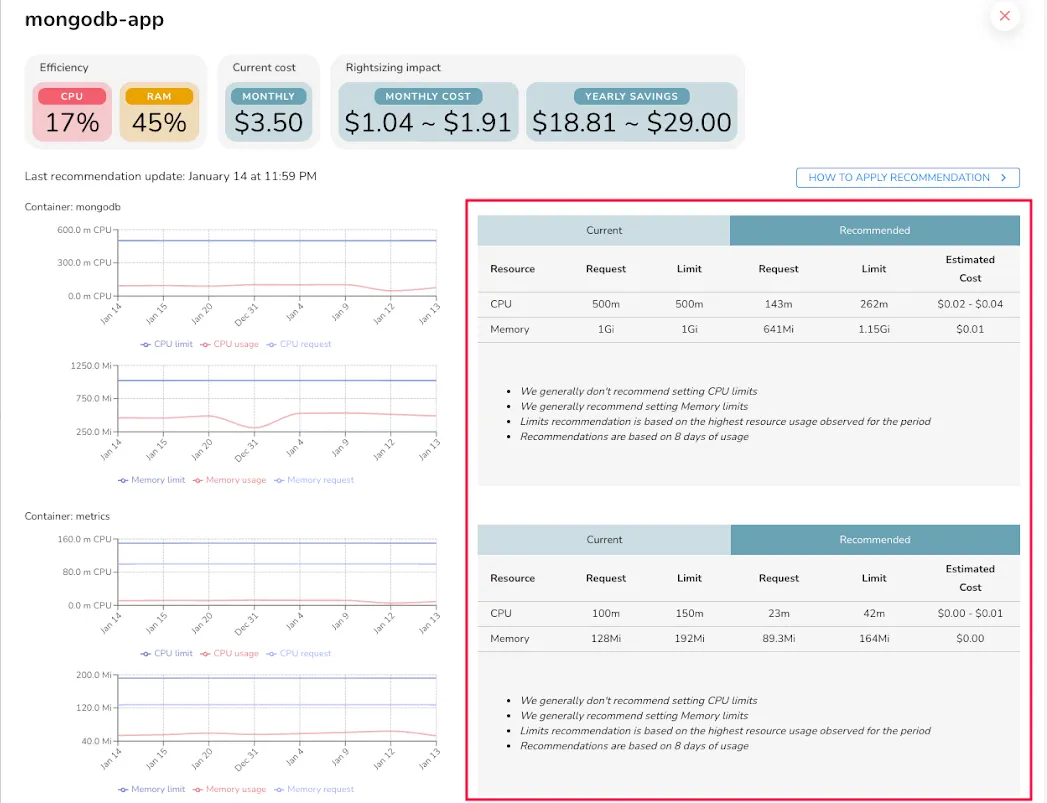
Randoli Rightsizing Recommendations
Conclusion
Managing resource allocation in Kubernetes can be challenging, but the Vertical Pod Autoscaler (VPA) makes it easier. By automatically adjusting CPU and memory requests, VPA helps ensure workloads always have the right amount of resources—helping you reduce costs, improve stability, and prevent performance bottlenecks.
Whether you’re a DevOps engineer, SRE, or FinOps professional, integrating VPA into your cluster can streamline resource management and make your workloads more efficient and scalable. With the right configuration, VPA takes the guesswork out of rightsizing, letting you focus on what matters—running reliable applications.
Want rightsizing recommendations, chargeback, and idle-workload detection without stitching VPA together yourself? See Cost & FinOps.