
Best Practices Analysis & CVE Scanning with KubeScape

Sandaruwan Lakshitha
August 28, 2025 · Updated September 27, 2026 · 3 min read
In short
Kubescape, an open-source CNCF project, scans Kubernetes clusters for misconfigurations, compliance gaps and image vulnerabilities, running in-cluster as an operator installed with Helm. Out of the box its results live in custom resources you query with kubectl, with no UI, no view across clusters and no alerting. Running it inside a broader platform adds those, and puts CVE and CIS posture next to the rest of your telemetry.
What is Kubescape?
Kubescape is an open-source security tool specifically designed to evaluate the security posture of Kubernetes clusters. It identifies vulnerabilities, misconfigurations, and compliance issues, offering detailed insights that empower teams to strengthen their environments against potential threats. As a CNCF incubating project, Kubescape is supported by a robust community of contributors, ensuring it stays at the forefront of Kubernetes security.
How to Install & Configure?
Installation
The Kubescape operator can be installed using Helm. Once installed, Kubescape runs as a set of microservices within a Kubernetes cluster. This setup enables continuous monitoring of the cluster’s status, including compliance and vulnerability management.
Run the installation command:
helm repo add kubescape https://kubescape.github.io/helm-charts/ ; helm repo update ; helm upgrade --install kubescape kubescape/kubescape-operator -n kubescape --create-namespace --set clusterName=`kubectl config current-context` --set capabilities.continuousScan=enableVerify that the installation was successful:
$ kubectl get pods -n kubescape
kubescape     kubescape-548d6b4577-qshb5    1/1     Running   0           60m
kubescape     kubevuln-6779c9d74b-wfgqf     1/1     Running   0           60m
kubescape     operator-5d745b5b84-ts7zq     1/1     Running   0           60m
kubescape     storage-59567854fd-hg8n8      1/1     Running   0           60m
Here’s what each of these services does:
- Kubescape - scanning cluster for misconfigurations
- Kubevuln - scanning container images for vulnerabilities
- Operator - scheduling scans
- Storage - provides an aggregated API server to expose Kubescape scan data inside the cluster
To see list of added CRDs to your cluster, use the following command:
$ kubectl api-resources | grep kubescape
applicationactivities                                     spdx.softwarecomposition.kubescape.io/v1beta1   true         ApplicationActivity
applicationprofiles                                       spdx.softwarecomposition.kubescape.io/v1beta1   true         ApplicationProfile
configurationscansummaries                                spdx.softwarecomposition.kubescape.io/v1beta1   false        ConfigurationScanSummary
generatednetworkpolicies                                  spdx.softwarecomposition.kubescape.io/v1beta1   true         GeneratedNetworkPolicy
knownservers                                              spdx.softwarecomposition.kubescape.io/v1beta1   false        KnownServer
networkneighborses                                        spdx.softwarecomposition.kubescape.io/v1beta1   true         NetworkNeighbors
openvulnerabilityexchangecontainers                       spdx.softwarecomposition.kubescape.io/v1beta1   true         OpenVulnerabilityExchangeContainer
sbomsyftfiltereds                                         spdx.softwarecomposition.kubescape.io/v1beta1   true         SBOMSyftFiltered
sbomsyfts                                                 spdx.softwarecomposition.kubescape.io/v1beta1   true         SBOMSyft
vulnerabilitymanifests                                    spdx.softwarecomposition.kubescape.io/v1beta1   true         VulnerabilityManifest
vulnerabilitymanifestsummaries                            spdx.softwarecomposition.kubescape.io/v1beta1   true         VulnerabilityManifestSummary
vulnerabilitysummaries                                    spdx.softwarecomposition.kubescape.io/v1beta1   false        VulnerabilitySummary
workloadconfigurationscans                                spdx.softwarecomposition.kubescape.io/v1beta1   true         WorkloadConfigurationScan
workloadconfigurationscansummaries                        spdx.softwarecomposition.kubescape.io/v1beta1   true         WorkloadConfigurationScanSummary
Configuration
Here we discuss major configuration changes that need to be made to evaluate the security posture of cluster.
Scanning private registries
If you need to scan private image repositories then you can set imagePullSecrets through the helm. See this chart.
Enabling capabilities
High-level capabilities of the Kubescape Operator can be configured using the values.yaml
capabilities:
  # ====== configuration scanning related capabilities ======
  #
  # Default configuration scanning setup
  configurationScan: enable
  # Continuous Scanning continuously evaluates the security posture of your cluster.
  continuousScan: disable
  nodeScan: enable
  # ====== Image vulnerabilities scanning related capabilities ======
  #
  vulnerabilityScan: enable
  relevancy: enable
  # Generate VEX documents alongside the image vulnerabilities report (experimental)
  vexGeneration: disable

  # ====== Runtime related capabilities ======
  #
  runtimeObservability: enable
  networkPolicyService: enable
  runtimeDetection: disable
  malwareDetection: disable
  nodeProfileService: disable
  seccompProfileService: enable

  # ====== Other capabilities ======
  #
  # This is an experimental capability with an elevated security risk. Read the
  # matching docs before enabling.
  autoUpgrading: disable
  prometheusExporter: disable
  # seccompGenerator: disable

#extra capability - service discovery option
serviceScanConfig:
  enabled : false
  interval: 1h
Set scan scheduling frequency
- To change the frequency of running workload configuration scans, you need to change the value of this parameter kubescapeScheduler.scanSchedule in helm.
- To change the frequency of running vulnerability scans, you need to change the value of this parameter kubevulnScheduler.scanSchedule in helm.
**Note :**See the GitHub repository for the Kubescape operator to learn the full set of configuration parameters.
How to see Results?
All the compliance scanning & vulnerability scanning results will be available gradually as the scans are completed.
Compliance scanning
View Compliance summary report per namespace:
kubectl get configurationscansummariesView Compliance summary report for each workload:
kubectl get workloadconfigurationscansummaries -AView Compliance detailed report for each workload:
kubectl get workloadconfigurationscans -AImage Vulnerabilities scanning
View Vulnerabilities summary report per namespace:
kubectl get vulnerabilitysummariesView vulnerabilities summary report for each workload/image:
kubectl get vulnerabilitymanifestsummaries -AView vulnerabilities detailed report for each workload/image:
kubectl get vulnerabilitymanifests -AChallenges with Running Kubescape on Its Own
Kubescape does the scanning well, but on its own it leaves the operational side to you:
- No UI. The operator writes results to the custom resources shown above. Reading them means
kubectl getandkubectl describe, which is workable for one engineer checking one cluster, and hard to hand to anyone else. - One cluster at a time. Each cluster runs its own operator and stores its own results. There’s no built-in view of posture across clusters.
- No alerting. Nothing tells you when a new critical CVE shows up in a running workload. You find out when someone next goes looking.
- Security in isolation. Scan results live apart from your performance, cost, and incident data, so connecting a vulnerable image to the service it runs in, and to who owns it, is manual work.
Kubescape as Part of Randoli
Security Posture for Kubernetes in Randoli is powered by Kubescape, running in the same data plane that already collects your logs, traces, and metrics, so there’s no separate operator to install and maintain.
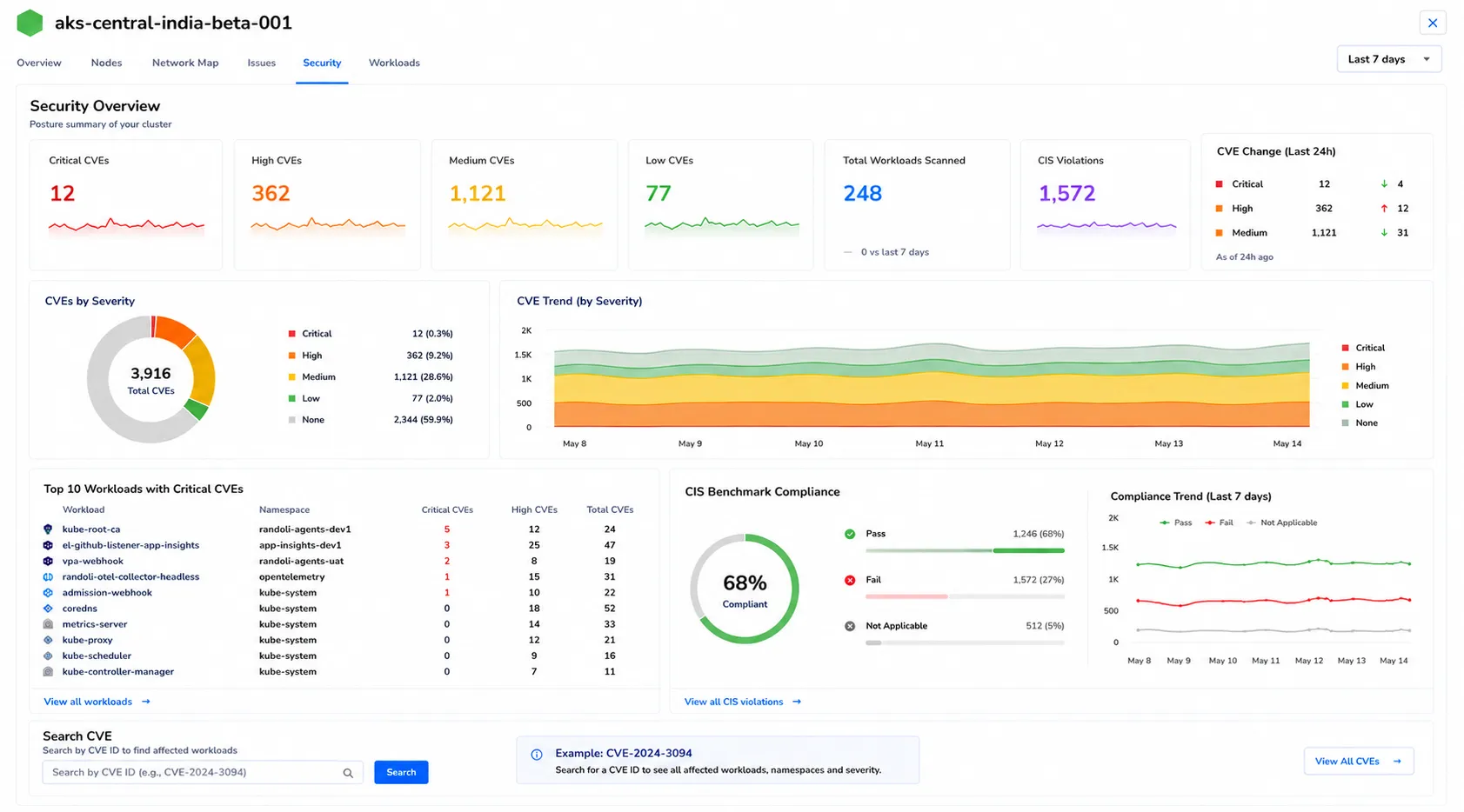
It covers the gaps above:
- CVE scanning and CIS Benchmark scoring at the workload, namespace, and cluster level, with drill-down from cluster-wide exposure to the specific workload driving it.
- Every cluster in one place, alongside APM and cost data rather than in a separate security dashboard.
- Anomaly detection on critical CVEs. Randoli alerts on sudden spikes in critical or high-severity CVEs, through the same channels as the rest of your alerting (Slack, email, PagerDuty, Teams).
- Local processing. Scanning happens in your environment. Only posture signals and alerts reach Randoli’s control plane, never raw vulnerability data.
Security is priced at $0.02 per host, per hour; see pricing for the full breakdown.